Trade Operations
The manual repair workflow for the strategy-vs-broker reconciliation lifecycle. Four tabs, each a small single-purpose tool over the same underlying orders, executions, and strategy-event history — not one generic screen trying to do everything.
Most orders attribute automatically. Orders that require manual handling are managed here: confirming pending events, attributing or voiding unattributed trades, and identifying discrepancies between strategy and broker-reported positions.
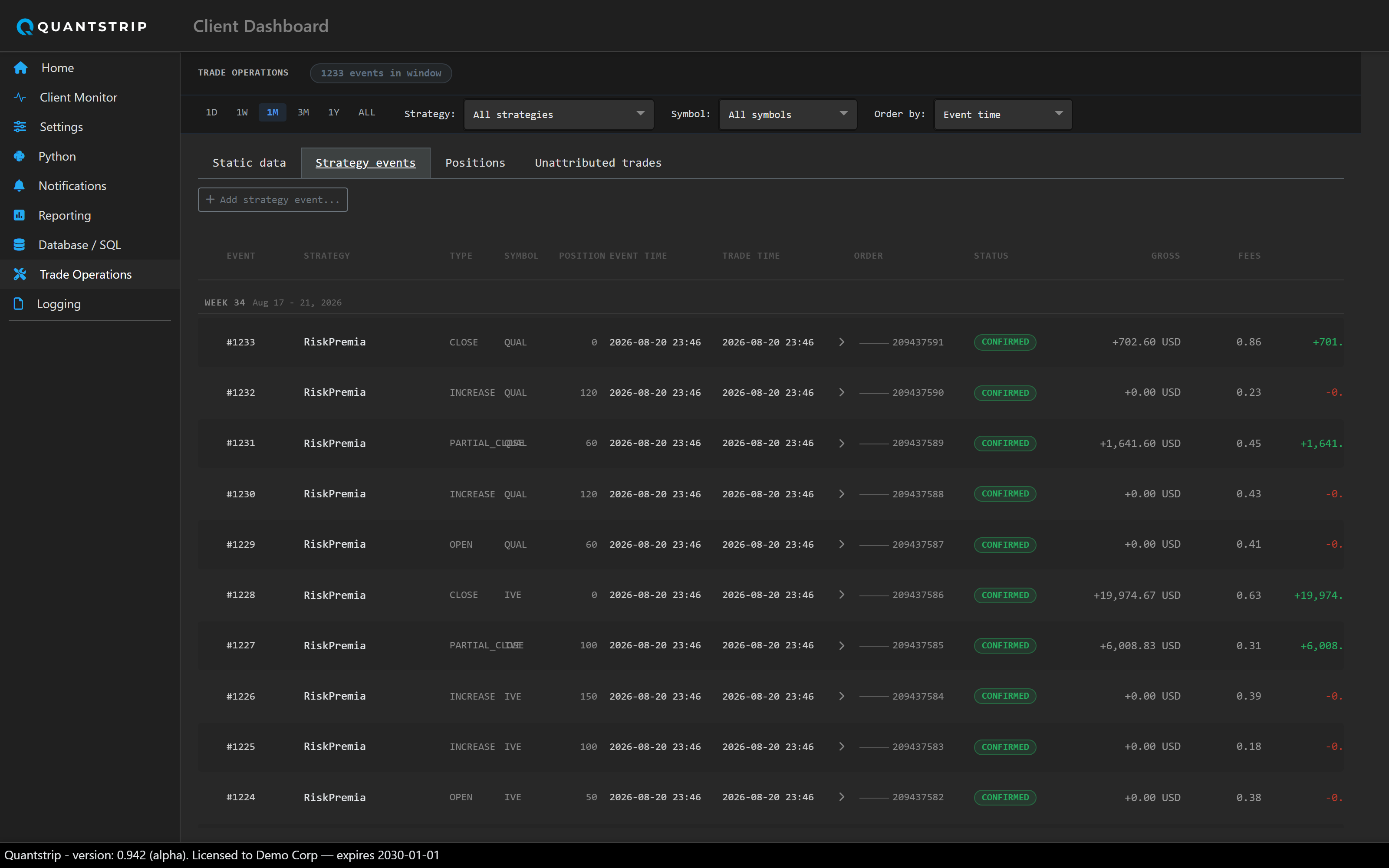
docs/assets/screenshots/ and it will appear here automatically.
Static Data
CRUD for the two reference tables the rest of this page depends on: brokers and strategies. Brokers and strategies must be created here before they can be referenced elsewhere on this page.
Strategy Events
The full history of strategy_event rows — every status, not just exceptions —
filterable by rolling time window, strategy, and symbol. Each row expands (via a chevron) to
show its underlying order and that order's executions.
| Concept | What it means |
|---|---|
Trade time |
The event's event_time — when the trade actually happened. |
Event time |
The event's create_time — when the row was written to the DB. The
"Order by" dropdown lets you sort by either. |
| Status | PENDING or CONFIRMED. There is no FAILED status. Confirming a zero-fill event (position unchanged) and confirming a partial fill are the same operation, differing only in target position. |
Confirming a PENDING row opens a single inform-and-confirm modal: no editable
fields, no note, no picker. It displays the result of confirming (computed with the same
formula the strategy's own automated confirm pass uses) and applies it on click. An event
cannot be confirmed until the NYSE session it was created in has closed, since the order may
still be live at the broker and its fill state is not yet final.
"Add strategy event…" is a separate inline panel that expands below the tabs. Select a strategy and an action — Open, Increase, Decrease, or Close — and the panel lists only the orders eligible for that action given the strategy's current position. This panel is also where the Unattributed Trades tab (below) routes attribution.
Deleting a manually-added event is restricted to the single latest event on a given strategy/symbol pair, preventing gaps in the history.
Positions
One row per symbol. One column per strategy shows its current confirmed position, summed across every broker it trades on. One column per broker shows that broker's latest reported position. A rightmost Delta column shows summed strategy positions minus summed broker positions. Delta should be approximately zero when strategy and broker positions are fully reconciled; a nonzero Delta indicates an attribution or reconciliation discrepancy.
Unattributed Trades
Every order still sitting with strategy_id = -1 — one row per order (symbol,
side, time, PnL if any, fill/total). Each row's dropdown offers only the strategies actually
eligible for that specific trade: the same OPEN/INCREASE/DECREASE/CLOSE rule table from the Add
Event panel, applied in reverse per strategy against that order's side, quantity, and PnL, plus
a permanent Void option.
Selecting a strategy does not attribute the trade directly. It navigates to the Strategy Events tab with the Add Event panel open, pre-filled with that strategy, the order's symbol, the resulting action, and the order itself pre-selected. Attribution logic is implemented once, in the Add Event panel's apply logic; this is a navigation shortcut into that workflow, not a separate implementation.
Selecting Void instead permanently excludes the order from this list. This is a simpler operation with no strategy event and no position tracking, for orders that will never be attributed to a strategy. Voided orders are hidden by default; a "Show voided trades" checkbox reveals them, and a voided row can be re-attributed to a strategy the same way as any other row.